CtaButton
- Category
- Actions
- Status
- WIP (wireframe-fidelity)
- Owner
- Ofek (variations gated on “Ask Ofek Before Use”)
- Composed by
- Card (CtaButtonM inside CardMedium’s bottom slot)
The CtaButton is the pill-shaped call-to-action used inside a Card’s bottom slot. It carries a leading icon (a location pin in the wireframe), a numeric label (the reward count), and a decorative lock badge that hangs off the bottom-left corner. It ships at two sizes (Medium and Small), each with a Frame=Yes/No visual treatment. This is the button the Card doc’s Gap #6 named as a follow-up; CtaButtonM at 294 x 112 px is the exact instance CardMedium composes.
Anatomy
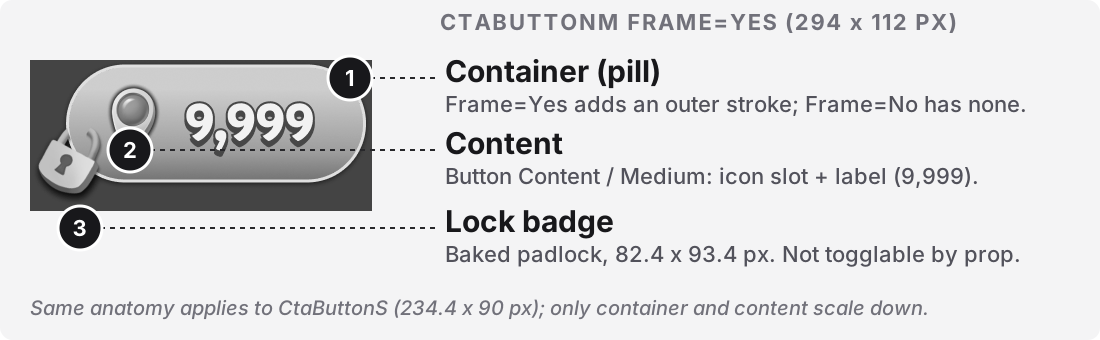
Section titled “Anatomy”Numbered callouts on the CtaButtonM Frame=Yes variant.
| # | Part | Required | Notes (Figma layer / code slot) |
|---|---|---|---|
| 1 | Container (pill) | Yes | Rounded pill shape. On Frame=Yes the pill carries a dark outer stroke that visually frames the button; on Frame=No the same pill has no stroke. Everything else is identical. [TODO: measure stroke width and color token]. |
| 2 | Content | Yes | The label + optional leading icon. Instance of Button Content / Medium (468:1453/56) on M, Button Content / Small (468:1462/65) on S. The content atom is its own component with ShowIcon=Yes/No sub-variants; the CtaButton wrapper does not surface ShowIcon as its own prop. In the wireframe the icon is a location pin and the label is 9,999. |
| 3 | Lock badge | Yes (baked, cannot be toggled) | A decorative padlock at 82.4 x 93.4 px, positioned at x = -33.28, y = 42.88, outside the pill’s left edge, overlapping the bottom-left corner. The badge is a Lock frame containing a Subtract boolean-operation and a baked image 734 PNG. It is present in both Frame=Yes and Frame=No masters, structurally, in the metadata. |
Parts not shown in the diagram (structural notes):
Button Content / MediumandButton Content / Smallare separate frames that live in the olderButtons - Publishedsection (468:1452and468:1461), not inside theButtonsWIP section. Each hasShowIcon=YesandShowIcon=Nosymbols. The CtaButton masters currently reference only theShowIcon=Yesvisual state; theNovariant is not surfaced. See Gaps.- The lock badge is not a Card-level overlay. The Card doc’s Anatomy called it out as callout #4 (
CTA lock badge) and flagged[TODO: confirm the badge is part of the CtaButton component's own state, not a Card-level overlay]. That is now confirmed: the lock lives inside the CtaButton master itself, at negative x. This resolves that TODO in the Card doc.
The button has no focus ring drawn in Figma; focus behavior is [TODO: define with the front-end team].
Variants & Usage
Section titled “Variants & Usage”Two axes exposed at the CtaButton level: Size (2 values, M and S) and Frame (2 values, Yes and No). Four variants total. Screenshots below show the M pair separately and the S pair together (Frame=Yes on top, Frame=No on bottom for both):
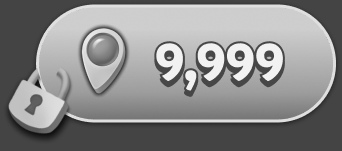
294 x 112 px
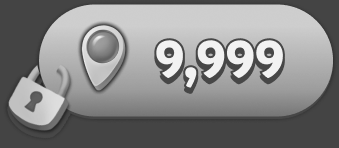
294 x 112 px
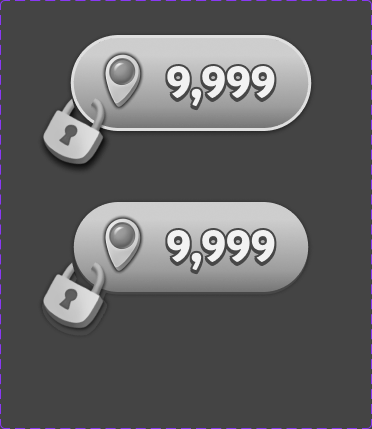
234.4 x 90 px
Reading each variant’s purpose from the naming plus context in the Card composition:
| Variant | Use when | Do not use when |
|---|---|---|
M / Frame=Yes |
The button sits on a busy or colored background and needs a visible outline to hold its shape. | The button sits inside a Card whose container already defines the visual boundary (use Frame=No). |
M / Frame=No |
The button sits inside a Card (CardMedium, CardLarge, or CardWide) where the Card container defines the frame. This is what CardMedium composes today. |
The button appears standalone with no surrounding container. |
S / Frame=Yes |
Small button on a busy background. | Inside CardSmall. [TODO: confirm S composition in CardSmall. The Sizing table shows a 280 x 110 bottom slot that could hold either S or M]. |
S / Frame=No |
Small button inside a Card. | Standalone. |
Anti-patterns:
- Using
Frame=Yesinside a Card. The Card container already frames the button; a second stroke reads as noise. - Instancing a CtaButton without a Card wrapper and expecting the lock badge to be togglable. The lock is baked into the master. To ship a “no lock” version today you must instance-override the layer visibility on
Lock, which is fragile and does not survive component updates. See Gap #4. - Using CtaButtonS on a screen where the primary action is the button. S is a subordinate size; M is the primary CTA size in this family.
Sizing
Section titled “Sizing”The two sizes shown at their actual pixel dimensions, bottom-aligned so the size ladder reads at a glance. Both rendered with Frame=Yes for comparability.
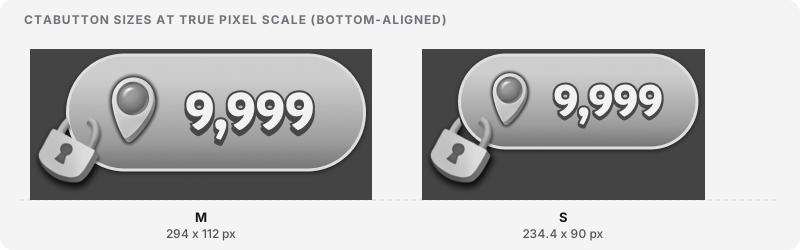
Measured dimensions per variant. All values read from Figma on 2026-09-06.
| Size | Pill (px) | Content atom (px) | Lock badge (px) | Number token |
|---|---|---|---|---|
M |
294 x 112 | 294 x 107 (Button Content / Medium, ShowIcon=Yes) |
82.4 x 93.4, at x=-33.28, y=42.88 (outside left edge) | SKU Meter (52) |
S |
234.4 x 90 | 234.4 x 85.6 (Button Content / Small, ShowIcon=Yes) [TODO: confirm S content atom dimensions] |
82.4 x 93.4, at x=-33.28, y=42.88 [TODO: confirm lock badge position on S; likely offset] | Running text (44) |
Pill border-radius, corner geometry, drop-shadow, and Frame=Yes stroke: [TODO: measure in Figma inspect panel]. From the render the pill appears to be a fully rounded stadium shape (radius equal to half the height) with a subtle inner highlight and a subtle drop-shadow, but none of these values have been read off the source.
States
Section titled “States”The CtaButton does not carry a state axis of its own in Figma. Two style variables are declared at the family level:
| Variable | Value returned by API | Notes |
|---|---|---|
CtaButtonActive |
(empty) | Referenced on both Frame=Yes and Frame=No masters, both M and S. Empty value returned. The Card composes this. |
CtaButtonDisabled |
Not referenced on any CtaButton master directly | Referenced by CardMedium in its Inactive state. Where the disabled visual actually lives in Figma is [TODO: confirm with Ofek]. |
State model as it exists today: the CtaButton itself has no Active / Disabled variant; those distinctions are applied at the Card composition level by swapping the CtaButtonActive and CtaButtonDisabled style variables. The lock badge is baked into the master and cannot be toggled by a prop.
Motion
Section titled “Motion”Motion for the CtaButton is not documented in Figma. get_motion_context recursive on CtaButtonM returned zero keyframe nodes (2026-09-06). No prototype connections.
The two implied CtaButton transitions:
| Trigger | Animated part(s) | Property | Duration | Easing | Reduced-motion behavior |
|---|---|---|---|---|---|
| Press | Container (pill), Content | transform: scale (a subtle depress) and possibly filter: brightness |
[TODO] |
[TODO] |
[TODO] swap instantly, no scale |
| Enabled to Disabled swap (at the Card level, but visible on this button) | Container fill, Lock badge appearance | background-color, and Lock layer visibility crossfade |
[TODO] |
[TODO] |
[TODO] swap instantly, no fade |
Motion contract owed. A shared motion.duration.press and motion.easing.press token, plus a motion.duration.state-change and motion.easing.state-change token (the last two shared with SKU and Card). Reduced-motion rule: prefers-reduced-motion: reduce disables the press-scale and swaps state changes instantly, no fade.
Content rules
Section titled “Content rules”- Label. The wireframe shows a formatted reward count (
9,999). Format follows the SKU number rules by convention:1to999as-is,1kto999k,1mto999m.[TODO: confirm the CTA number uses the same formatter as SKU, or has its own.] - Leading icon. In the wireframe, the icon is a location pin.
[TODO: confirm whether the icon slot is fixed to the location pin, or accepts any icon from a known icon set.]TheButton Contentcomponent’sShowIconvariant suggests the icon is optional at the content-atom level, though CtaButton does not currently surface this control. - Language / RTL:
[TODO: confirm.]The location-pin icon is directional and would need mirroring for RTL. The lock badge sits at the left edge of the button; for RTL it should mirror to the right edge. - Truncation / overflow: the pill has fixed width (294 on M, 234.4 on S). Numbers beyond the 4-character formatted cap will overflow.
[TODO: confirm truncation rule with front-end.] - Casing: number suffixes lowercase (
k/m), matching SKU.
Behavior and accessibility
Section titled “Behavior and accessibility”The CtaButton is the primary interactive control inside a Card. Focus, keyboard, and screen-reader behavior all live on this component, not on the Card.
- Element / role: the CtaButton should render as a
<button>element.[TODO: confirm with front-end team.] - ARIA: the accessible name should compose the label plus the state (
"Buy for 9,999"when unlocked,"Locked, 9,999"when locked,"Buy for 9,999, currently unavailable"when disabled). Exact strings[TODO: confirm the ARIA copy pattern.] - Keyboard: Tab moves focus onto the button when it is enabled. Enter and Space activate. Focus is skipped when the button is disabled.
[TODO: confirm focus model with front-end.] - Target size: the M pill is 294 x 112 px, the S pill is 234.4 x 90 px. Both exceed the WCAG 2.2 minimum (24 x 24 CSS px) and the 44 px touch minimum. The Lock badge itself is 82 x 93 px and sits outside the button’s tap area; it is decorative, not an additional target.
- Contrast: wireframe fidelity, using the Wireframe Palette. Real contrast values will land when the button promotes off the wireframe palette. On the current palette,
#f2f2f2label on#474747pill fill is approximately 8.9:1. - Focus ring: none drawn in Figma.
[TODO: define the focus ring token and behavior with front-end; must meet WCAG 2.4.11 focus-not-obscured and 2.4.13 focus-appearance minimums.] - Reduced motion:
[TODO: confirm.]See the Motion section. - How to test:
[TODO: define with the front-end team.]Suggested checks: (a) keyboard tab lands on the button when enabled, skips when disabled; (b) screen reader announces the label plus the state (enabled / locked / disabled); (c)prefers-reduced-motiondisables press scale.
Foundations and tokens
Section titled “Foundations and tokens”Variables Figma reports for the CtaButton family. Untokenized values are flagged as DEBT with the token decision that is missing.
| Property | Value | Token name (Figma) | Notes |
|---|---|---|---|
| brightest label text | #f2f2f2 |
Wireframe Palette/50 |
Primitive (wireframe). Same palette as SKU and Card. Not a semantic token yet. |
| light-grey highlight | #dfdfdf |
Wireframe Palette/200 |
Primitive. Used on the pill’s inner bevel highlight. |
| pill fill / dark stroke | #474747 |
Wireframe Palette/800 |
Primitive. Used on the pill background and (on Frame=Yes) as the outer stroke color. |
| shadow / darkest | #313131 |
Wireframe Palette/900 - Shadows & Meters |
Primitive. Used on the pill drop-shadow and lock badge shadow. |
| M number font-size | 52 | SKU Meter |
Primitive numeric token. Shared with SKU 56%. |
| S number font-size | 44 | Running text |
Primitive numeric token. Shared with SKU 48%, Card CTA label. |
| CTA style: Active | CtaButtonActive |
(empty value) | Style variable declared but returns empty from the API. Same DEBT as noted in the Card doc. |
| CTA style: Disabled | CtaButtonDisabled |
(empty value; also not referenced by CtaButton masters directly) | Referenced by Card, not by CtaButton. Location of the actual disabled style [TODO: confirm]. DEBT. |
| pill border-radius | [TODO: measure] |
none | DEBT Hardcoded. Missing token: button.pill.radius or a shared radius.pill (fully rounded stadium). |
| pill drop-shadow | [TODO: measure] |
none | DEBT Hardcoded. Missing token: elevation.button or a shared elevation.raised. |
| Frame=Yes outer stroke | [TODO: measure width and color] |
none | DEBT Hardcoded. Missing token: button.frame.stroke and button.frame.width. |
| Lock badge dimensions | 82.4 x 93.4 px, position (-33.28, 42.88) from pill origin | none (baked image) | DEBT Baked image with hardcoded offset. Missing: a proper Lock component with tokenized size and position, driven by a locked boolean prop. |
Gaps found
Section titled “Gaps found”- Not a proper Figma component set.
CtaButtonM(474:10351) andCtaButtonS(474:10366) are plain frames wrapping two loose symbols each (Frame=Yes,Frame=No). TheFrame=Yes/Nonaming uses variant syntax but there is no actual component-set property. Consumers cannot swapFramevia a Figma prop menu; they must instance-swap the raw symbols. Convert to a real component set with aFramevariant property. - The lock badge is baked, not togglable. The
Lockframe is present in bothFrame=YesandFrame=Nomasters. There is noLocked=true/falseprop. To ship an unlocked-looking button today you must instance-override theLocklayer’s visibility, which is fragile and does not survive component updates. Promote to alockedboolean prop and control the badge from that. Frame=YesandFrame=Noshare identical variables. Both variants pull the sameWireframe Palette/50, 200, 800, 900set and the sameSKU Meter(orRunning text) numeric token. The visible delta is the outer stroke onFrame=Yes, but the stroke color and width are not tokenized. Same pattern as Card’s Active/Default catch. Promote the stroke tobutton.frame.strokeandbutton.frame.widthtokens.ShowIconvariant on the content atom is not exposed at the CtaButton level.Button Content / Mediumand/ Smalleach haveShowIcon=YesandShowIcon=Nosub-variants (218 x 70 for the no-icon version on M). CtaButton only references theYesvariant. Either surfaceshowIconas a boolean prop on CtaButton, or delete theNosub-variant if it is not intended for CtaButton use.- Naming split:
CtaButtonvsCTA Button. TheButtons - Publishedsection (468:1429) contains manyCTA Buttoninstances (spaces). TheButtonsWIP section usesCtaButton(camel). Standardize on one. Given the composition target (React / codegen), camel is the safer choice. Button Contentlives in the wrong section. TheButton Content / Mediumand/ Smallframes sit in the468 Buttons - Publishedsection, not in the474 ButtonsWIP section where their consumers live. This crosses the wireframe / published boundary. Either move them into the WIP section, or accept that the WIP CtaButton depends on published content atoms (and document the dependency).- Motion is undefined. Now a system-level gap. No keyframes, no prototype connections, no motion tokens. Three WIP components in a row (SKU, Card, CtaButton) have shipped with zero motion definition. The Active Watch on motion in
M-memory/snapshot.mdwas at count 2; this trace promotes it to count 3, which per the watch’s own rule (3+ -> promote to C-core and remove) means motion should now be a documented system-level standard, not a per-component TODO. Draft amotion.mdinC-coreor a[trace]correction infeedback-system.md. - Pill radius, drop-shadow, Frame stroke, and Lock badge geometry are all hardcoded. None of the four is tokenized. Introduce
button.pill.radius(or sharedradius.pill),elevation.button(or sharedelevation.raised),button.frame.stroke+button.frame.width, and a properLockcomponent with tokenized position. - The Card doc’s Anatomy TODO on the lock badge is resolved. Card Anatomy callout #4 said
[TODO: confirm the badge is part of the CtaButton component's own state, not a Card-level overlay]. This trace confirms: the lock is inside the CtaButton master itself. Update the Card doc when convenient. CtaButtonDisabledis referenced by Card but not by any CtaButton master. The Card doc’s Foundations table citesCtaButtonDisabledas the CTA style Card swaps in on itsInactivestate. The CtaButton masters here reference onlyCtaButtonActive. EitherCtaButtonDisabledis a Card-level override the Card applies unilaterally, or it is a style defined on a different CtaButton master not covered by this trace. Confirm with Ofek.CtaButtonActivereturns empty from the API. Same as noted in the Card doc. Either the style is empty, or the Figma API does not expose its contents. Confirm with the CTA owner.Buttons - Publishedsection is a governance mystery. The published section (468:1429) holds a much bigger family:CTA Buttonin 6+ widths and multiple color styles (green Play, orange Free, red Buy per the page overview). None of this is used by the WIP components. Either this is legacy, or it is the “real” button family the WIP will graduate to. Answer this before shipping any consumer that expects the WIP CtaButton to be a stable API.- Playtika rendering language check. The pill uses Wireframe Palette tones and a subtle inner bevel for depth, not a web-style drop-shadow.
Frame=Yesadds an explicit dark outline to visually separate the button when it sits on a busy background. Both choices align with the house rule (hierarchy via outlines / containers, not web-style shadows). Good. Document explicitly so future button variants do not slip into single-shadow “web” hover effects.